Eclipse Plugin
Bring the power of OSGi.fx directly into your development environment with the OSGi.fx Eclipse Plugin — no separate desktop app installation required.
Plugin Highlights
- ⚡ Seamless Launch: Start the OSGi.fx console directly from Eclipse.
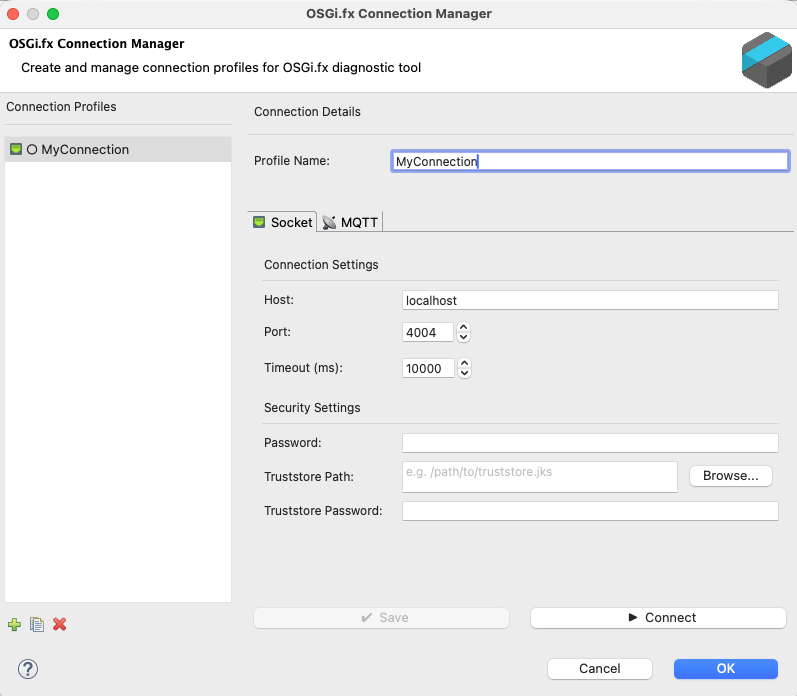
- 🛠️ Connection Profiles: Manage your Socket and MQTT connections within the IDE.
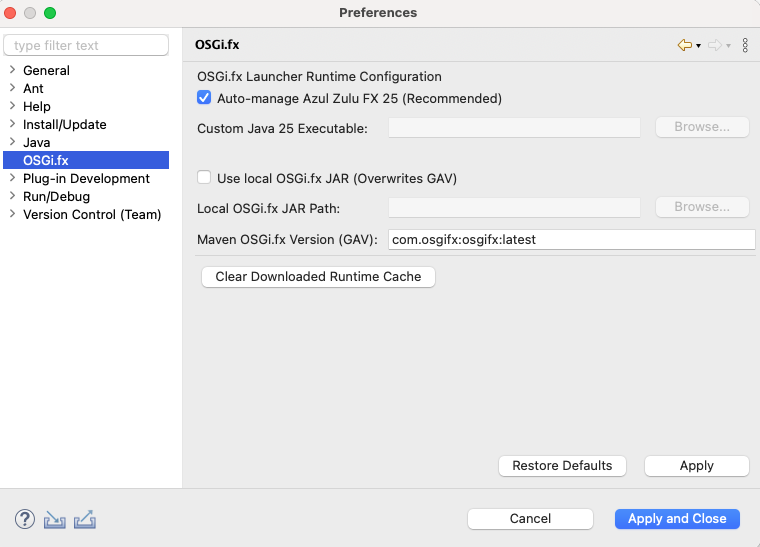
- ⚙️ Auto-Managed Runtime: Automatic setup of the required JavaFX 25 environment — no manual JVM configuration needed.
- 🎨 Visual Status: Real-time tracking of connection status with intuitive icons.
- 🛡️ Standalone Independence: The plugin runs entirely separate from the desktop application — no standalone app install required.
[!NOTE] Minimum Requirements: Eclipse IDE for RCP/RAP Developers (2022-06 or later) with Java 17+.
Installation
The easiest way to install is via the Eclipse Marketplace — simply click Install from the marketplace listing and restart Eclipse.
If you prefer manual installation (e.g., for a specific version or air-gapped environments), use Help > Install New Software... and add one of the following update sites:
- 🚀 Latest Release:
https://osgifx.com/eclipse - 🧪 Staging / Beta:
https://osgifx.com/eclipse-staging
Plugin Features in Action
Connect Dialog
Seamlessly manage and connect to your remote OSGi frameworks using the dedicated connection dialog integrated within your Eclipse workspace.
Preferences Configuration
Tailor the plugin’s behavior to your requirements, such as configuring the JVM and OSGi.fx launcher settings, conveniently through Eclipse Preferences.
Related Pages
- Headless Launch — the underlying mechanism powering plugin connections.
- Remote Agent Documentation
- Getting Started