MCP Server
An MCP (Model Context Protocol) server that connects LLMs (like Claude) to a running OSGi framework. This allows you to diagnose, monitor, and debug remote OSGi runtimes using natural language.
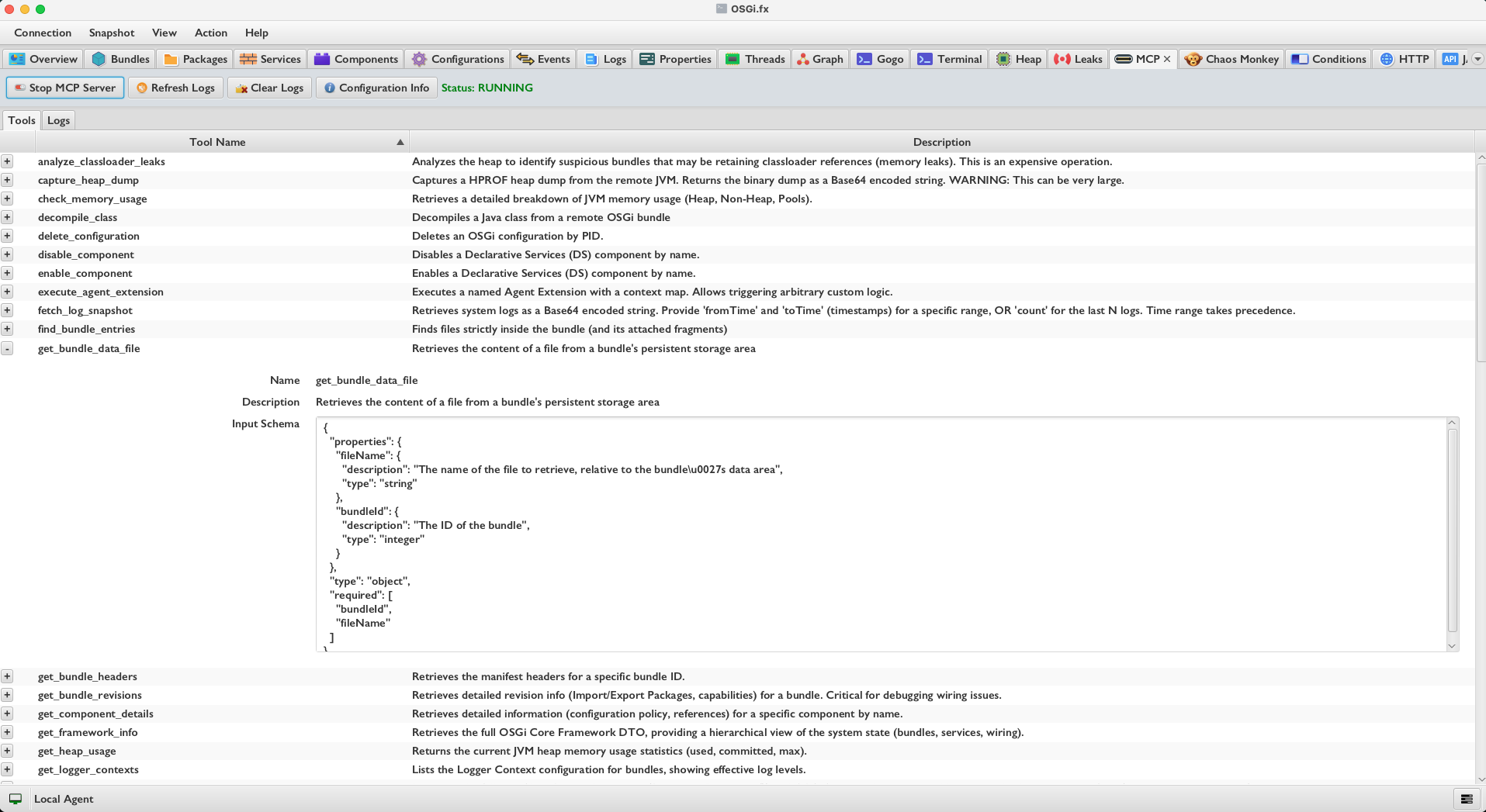
Features
- 🔍 Deep Diagnostics: Inspect bundles, services, components (DS), and configurations.
- 🛡️ Safety First: Read-only by default. Dangerous Gogo commands are blocked.
- 📊 Real-time Monitoring: Check heap usage, threads, and memory pools.
- ⚡ Log Analysis: Fetch and filter logs by time range or count.
Getting Started
1. Enable the MCP Server
The MCP server is built into the OSGi.fx application.
- Launch OSGi.fx.
- Connect to your remote OSGi framework (Agent).
- Navigate to the MCP tab.
- Click Start MCP Server.
- Note: The button is disabled if the agent is not connected.
- The server will start on port
8080(default).
2. Server Management
- Start/Stop: Use the toggle button to control the server.
- Auto-Stop: The server automatically stops if the connection to the OSGi Agent is lost.
- Logs:
- Refresh Logs: Updates the log view (only enabled when server is running).
- Clear Logs: Clears the current log view.
3. Client Configuration (SSE)
Configure your MCP client (e.g., Claude Desktop, Cursor, Windsurf) to connect to the OSGi.fx MCP server.
Recommended Configuration (Streamable HTTP): Streamable HTTP is the current MCP standard transport (2025-03-26+). It uses a single endpoint for both streaming and messages. Most modern clients support this.
{
  "mcpServers": {
    "osgifx": {
      "serverUrl": "http://localhost:8080/mcp",
      "type": "sse",
      "disabled": false
    }
  }
}
Fallback Configuration (Traditional SSE):
Traditional SSE uses separate endpoints for the stream (/sse) and messages (/messages). Use this if your client does not yet support Streamable HTTP.
{
  "mcpServers": {
    "osgifx": {
      "serverUrl": "http://localhost:8080/sse",
      "type": "sse",
      "disabled": false
    }
  }
}
4. Protocol Compatibility
The OSGi.fx MCP Server actively negotiates the Model Context Protocol version during initialization.
- Latest Supported Version:
2025-11-25(Full support for the latest MCP specification). - Widely Supported Version:
2025-03-26(Ensures compatibility with most modern AI clients). - Backward Compatibility:
2024-11-05is fully supported for older clients.
Clients requesting unsupported versions will be offered 2025-11-25 as the fallback negotiated version.
5. Security
The MCP server implements the following security measures per the MCP specification:
- Origin Validation: All incoming HTTP requests are validated against a localhost allowlist (
localhost,127.0.0.1,[::1]) to prevent DNS rebinding attacks. Requests from untrusted origins are rejected with HTTP 403. - CORS: Cross-Origin Resource Sharing headers are set with the validated origin (not a wildcard), and
Access-Control-Expose-Headersis configured so clients can readMCP-Protocol-Versionand session ID headers. - Protocol Version Enforcement: Requests with an unsupported
MCP-Protocol-Versionheader (outside of initialization) are rejected with HTTP 400. - Session Management: Session IDs are generated as cryptographically random UUIDs and reflected in
Mcp-Session-Idheaders.
Available Tools
| Tool Name | Description |
|---|---|
list_bundles |
Lists all installed OSGi bundles with state, version, and ID. |
list_services |
Lists all registered services and their properties. |
list_components |
Lists Declarative Services (DS) components and their satisfaction state. |
list_configurations |
Lists OSGi Configuration Admin configurations (PIDs). |
list_remote_services |
Lists OSGi Remote Services Admin endpoints (exports and imports). Filter by direction. |
list_http_components |
Lists registered Servlets, Filters, and Resources (HttpService). |
list_threads |
Lists JVM threads with states (use for deadlock detection). |
get_system_properties |
Retrieves Java System Properties (e.g., java.version) and Framework properties. |
get_heap_usage |
Returns current JVM heap memory statistics. |
check_memory_usage |
Detailed breakdown of Heap, Non-Heap, and Memory Pools. |
fetch_log_snapshot |
Retrieves system logs. Supports filtering by time range or count. |
analyze_classloader_leaks |
(Heavy Operation) Analyzes the heap for potential bundle classloader leaks. |
run_health_checks |
Executes Felix Health Checks. |
run_gogo_command |
Executes raw Gogo shell commands (restricted access). |
ping_agent |
Verifies connectivity to the remote OSGi agent. |
read_dmt_node |
Reads values and metadata from a specific Device Management Tree (DMT) node URI. |
run_garbage_collection |
Triggers a System.gc() on the remote JVM. |
capture_heap_dump |
Captures a HPROF heap dump from the remote JVM. |
start_bundle |
Starts the bundle with the specified ID. |
stop_bundle |
Stops the bundle with the specified ID. |
get_bundle_headers |
Retrieves the manifest headers for a specific bundle ID. |
enable_component |
Enables a Declarative Services (DS) component by name. |
disable_component |
Disables a Declarative Services (DS) component by name. |
get_component_details |
Retrieves detailed information for a specific component. |
update_configuration |
Updates or creates an OSGi configuration (PID & properties). |
send_event |
Sends an OSGi event to a topic. |
update_logger_context |
Updates Logger Context log levels for a bundle. |
install_bundle |
Installs a bundle from a URL. Returns Bundle ID. |
uninstall_bundle |
Uninstalls the bundle with the specified ID. |
get_bundle_revisions |
Retrieves detailed revision info (wiring/capabilities) for a bundle. |
delete_configuration |
Deletes an OSGi configuration by PID. |
execute_agent_extension |
Executes a named Agent Extension with a context map. |
find_bundle_entries |
Finds files strictly inside the bundle (and its attached fragments). |
list_bundle_resources |
Finds resources in the bundle’s classpath (includes imports). |
get_bundle_data_file |
Retrieves the content of a file from a bundle’s persistent storage area. |
list_health_checks |
Lists the status of all registered Health Checks (Felix HC). |
get_logger_contexts |
Lists the Logger Context configuration for bundles, showing effective log levels. |
list_user_admin_roles |
Lists all configured user roles and permissions from the UserAdmin service. |
list_gogo_commands |
Lists all available Gogo shell commands across all scopes. |
get_framework_info |
Retrieves the full OSGi Core Framework DTO, providing a hierarchical view of the system state. |
decompile_class |
Decompiles a Java class from a remote OSGi bundle, returning its source code. |
refresh_packages |
Refreshes the framework wiring (package refresh). |
System Prompt / Guiding Principles
When configuring your LLM (e.g., Claude), use these principles to ensure safe and effective operation:
### Guiding Principles

1.  **Diagnostic First:** Always inspect the state (`list_bundles`, `get_component_details`) *before* attempting to change it.
2.  **Action Confirmation:** You are authorized to perform state-changing operations (`start`, `stop`, `update`) when explicitly requested by the user.
    * *Caution:* If a user asks to "fix it," explain what you plan to do (e.g., "I will restart the bundle") before calling the tool.
3.  **Terminology Precision:**
    * **"Properties"**: Java System Properties.
    * **"Configurations"**: OSGi Config Admin (PIDs).
Safety Constraints
- Restricted Commands: State-changing Gogo commands (e.g.,
stop,uninstall,update) are blocked inrun_gogo_commandto encourage using the dedicated tools (stop_bundle). - Heap Dumps: The
capture_heap_dumptool returns large binary blobs; ensure your client can handle them.
Spec Compliance Notes
- JSON-RPC Batching: The server supports JSON-RPC batch requests (arrays of requests/notifications) as required by the
2025-03-26specification. - Tool Pagination: The
tools/listresponse supports cursor-based pagination (page size of 50). Clients can pass acursorparameter and receive anextCursorin the response. - SSE Event IDs: All Server-Sent Events include unique
id:fields to support client reconnection and stream resumability. - Capability Declaration: The server only declares
toolsin its capabilities. It does not advertiseresourcesorpromptssince those are not implemented.
Troubleshooting
“Agent is not connected” Ensure the OSGi Agent bundle is installed and running on the target framework and that the supervisor is configured to connect to the correct host/port.
“Tool execution timed out”
Heavy operations like analyze_classloader_leaks or capture_heap_dump may take time. Ask the model to wait or try again.
Related Pages
- Remote Agent Documentation — learn how the agent connects to your OSGi framework.
- Getting Started